
Wireless charge Phone to Phone
MasivappLibraries & Demo
4.1126.00 Reviews
- Version
- 12.0
- Installs
- 100.00K
- Age Rating
- Everyone
Screenshots
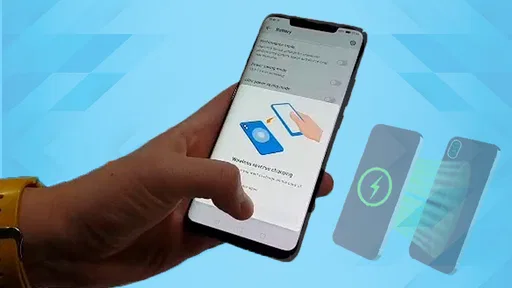
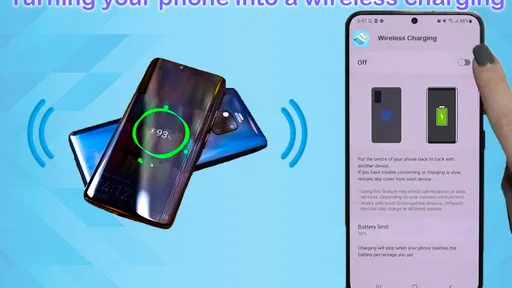
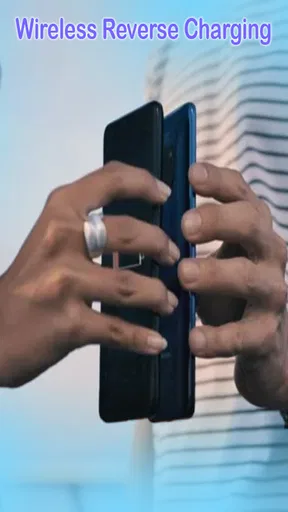
Our Review of Wireless charge Phone to Phone
 Analysis by Appyee
Wireless charge Phone to Phone is a small utility from Masivapp built around a simple idea: using one compatible phone to share power with another without plugging the two devices together. I found the concept interesting because it turns a feature that many people overlook into something easier to understand and try. It sits in the Libraries & Demo section, but its practical appeal is much closer to a quick charging aid for everyday situations.
The app is free and suitable for Everyone, which makes it easy to test without committing money or learning a complicated system. Its store summary describes wireless reverse charging through a phone, while the short description reduces the idea to “Wireless charge.” That simplicity is both the attraction and the main warning: the app can help you work with a phone feature, but it cannot create wireless power-sharing hardware where the phone itself does not support it.
How I used it in a normal phone-to-phone charging routine
My first approach was deliberately basic. I opened the app on the phone I wanted to use as the power source, checked whether that device offered a reverse-charging or battery-sharing option in its own system controls, and then placed the second phone against the rear of the source phone. The important step was not treating the app as a magic switch. It works best as a guide around a capability that must already exist in the hardware and operating system.
That distinction matters more than the app’s short description suggests. If your phone has no wireless charging transmitter, an application cannot add the necessary coil, power-management hardware, or magnetic alignment system. In that situation, the useful outcome is simply learning that a cable, power bank, or ordinary wireless pad is the better solution. I would not install this expecting every Android phone to become a charging station.
In a realistic scenario, imagine leaving home with two phones and discovering that the smaller one is nearly empty before a journey. If the main phone supports reverse wireless charging, I can open the utility, confirm the relevant system setting, remove thick cases, and place the devices back-to-back while both remain still. This is most useful for keeping a second phone alive long enough for navigation, authentication, a call, or a ticket—not for quickly filling a battery from empty to full.
Alignment is part of the routine. Wireless power transfer is sensitive to position, so I learned to move the receiving phone slowly across the back of the source phone rather than assuming the center is identical on every model. A case with a wallet compartment, metal plate, or unusually thick protection can interfere with the result. Removing those obstacles is a more practical improvement than repeatedly reopening the app.
I also recommend beginning with the source phone comfortably charged. Reverse charging draws energy from that device, and the receiving phone may gain less power than the source loses because wireless transfer is not perfectly efficient. This creates an important trade-off: rescuing a second device is worthwhile when the source phone has plenty of reserve, but risky when both phones are already close to empty.
The app’s role is therefore best understood as a starting point for a repeatable workflow. It brings attention to a function that may otherwise be buried in quick settings. Once I know where the phone manufacturer placed the control, I can often complete the process faster from the system panel and use the app mainly when I need a reminder or a simple demonstration.
Settings I would check before relying on it
The first setting worth checking is whether wireless reverse charging is available and enabled on the source phone. Manufacturers use different names for this function, so I look through battery, power, connected-device, and quick-setting areas rather than searching in only one menu. The exact label may vary, but the requirement does not: the source phone must be capable of sending power wirelessly.
Next, I check whether the phone has a battery threshold that automatically stops sharing. A protective limit is useful because it prevents the source device from sacrificing all of its remaining charge. If the system offers such a control, I prefer a conservative threshold when I am away from a charger. The point of the routine is to help another device without leaving my primary phone unable to perform essential tasks.
Screen timeout and locking behavior are also worth considering. Some phones keep the feature active after the display turns off, while others make the state less obvious. I keep the first test short and watch the battery indicators on both devices. This avoids discovering much later that the phones were misaligned or that charging stopped when the source phone changed state.
Before starting, I turn off unnecessary activity on the receiving phone. A bright display, video playback, navigation, or a large download can consume power almost as quickly as it arrives. This is one of the less obvious ways to improve the experience: wireless sharing becomes more useful when the receiving phone is idle or performing only a light task. The goal is often to stabilize the battery rather than produce a dramatic increase.
Location also matters. I would not use this arrangement while walking, cycling, or carrying both phones loosely in a pocket. Movement breaks alignment, and pressure between the devices can cause them to slide. A flat table, a car console when safely parked, or another stable surface is much better. I treat the app as something for controlled moments, not a replacement for a cable during active travel.
Temperature deserves attention as well. Two phones pressed together can trap heat, especially if either device is already warm from gaming, navigation, or direct sunlight. I stop the process if the phones become noticeably hot. A slower emergency charge is not worth stressing either battery, and the app cannot override the thermal protections built into the devices.
These checks also answer a question many new users have: does installing the app guarantee that charging will begin? No. The phone’s hardware and system support remain decisive. The app can make the idea more approachable, but the actual transfer depends on compatible devices, correct positioning, suitable settings, and a sensible environment.
Faster patterns for repeat users
After testing the basic routine, I stopped opening the utility for every small adjustment. Experienced use is mostly about reducing friction before the emergency happens. I place the source phone’s battery-sharing control somewhere easy to reach, remember the approximate coil position on both phones, and keep a short mental checklist: remove interfering cases, enable sharing, align the backs, and verify the charging indicator.
A useful habit is to test compatibility at home rather than waiting until one phone is nearly dead. A brief trial tells me whether the devices recognize one another and whether a case causes trouble. It also reveals which phone should be the source. If both devices support wireless charging in different ways, the one with the larger practical reserve is usually the better donor, though I still avoid draining it too far.
I found that a small alignment mark or a remembered camera-area position can save time, but I would not attach metal accessories or modify either phone just for this purpose. Wireless coils are not always located where the visual center suggests. A quick sliding adjustment is safer than forcing the devices into a position that presses against camera bumps or creates an unstable stack.
Another efficient pattern is to use the app as a learning tool and the phone’s quick settings as the everyday shortcut. This is especially helpful for someone who shares a device with a family member or wants to explain the process without navigating a long settings menu. Once the workflow is familiar, the utility becomes less central, but that does not make the initial guidance useless.
I would also schedule the process around low-demand moments. Charging while reading, waiting at a desk, or sitting in a parked car is more realistic than trying to do it during a busy commute. If the receiving phone only needs enough power for a two-factor code or a short call, a brief, stable session can be worthwhile. If it needs a full day of heavy use, a wired charger remains the more dependable choice.
The app has reached over one hundred thousand installs, and its average rating is 4.1 from around two thousand six hundred ratings. Those figures suggest that the idea has attracted real interest, but they should not be read as proof that it works identically across every phone. Reverse charging is unusually dependent on device model and system implementation, so personal compatibility testing matters more here than popularity alone.
Where the concept reaches its limits
The biggest limitation is physical rather than software-based. A phone without the required wireless power hardware cannot be transformed by Wireless charge Phone to Phone. This is why I would skip the app if my main goal is to charge an older or incompatible device and I have no way to verify that the source phone supports power sharing. A cable or compact power bank will be more predictable.
Speed is another limitation. Even when the connection works, sharing power wirelessly is generally an emergency or convenience feature rather than a fast-charging method. The source phone loses energy, the receiving phone may gain it slowly, and both devices can warm up. For a long charging session, a direct cable usually offers better efficiency and less dependence on exact placement.
Compatibility can also be uneven between brands and models. Two phones may both support wireless charging but not both support sending power. A phone may accept power from a pad while lacking the ability to transmit it. That difference is easy to miss, and it is the reason I would check the source phone’s own battery settings before assuming the app can help.
Cases and accessories create a further boundary. A thin case may be fine, while a case containing cards, magnets, or a thick grip can prevent a stable connection. I would never place bank cards between the phones during the test, and I would remove accessories that make the backs uneven. This is a practical safety habit, not an optional optimization.
The app is also not the right choice for users who expect a full battery-management dashboard, detailed charging analytics, or a replacement for the manufacturer’s controls. Its appeal is focused: it introduces and supports the phone-to-phone wireless charging idea. If you want extensive battery health information, a system settings page or a dedicated battery utility may suit you better.
Privacy-conscious users may reasonably prefer to use the built-in system feature once they understand it. I do not need a separate app every time I share power, especially when the phone’s quick settings already expose the control. On the other hand, beginners may value having a clearly focused tool that explains the intended action. The right choice depends on whether guidance or minimal software matters more to you.
The application is listed as free, which makes experimentation easier, and it is rated for Everyone. It was released on December 12, 2023, and the current version is 12.0, with support beginning at Android 7.0. Those details make it accessible to a broad range of Android users, but operating-system eligibility should not be confused with hardware compatibility. An older supported Android version may still run the app while lacking wireless reverse charging.
My verdict after building a repeatable habit
Masivapp has made a focused utility for a feature that can feel hidden or confusing. I like it most as a practical introduction: it encourages me to check whether a phone can share power, understand the positioning involved, and turn a rarely used capability into a simple emergency routine. The best result comes when I combine it with system shortcuts, sensible battery limits, and a stable place to keep the phones aligned.
The key lesson is that the app supports a capability; it does not manufacture one. If your source phone already offers wireless reverse charging, this can be a convenient way to explore and remember the process. If it does not, the app will not replace a cable, charging pad, or power bank. That distinction should guide the download decision more than the attractive simplicity of the concept.
I would recommend it to Android users who own compatible hardware, occasionally need to rescue a second phone, or want an approachable demonstration of reverse wireless charging. It is also useful for someone helping a less technical family member understand why two phones can sometimes share power. The free price removes the main barrier to trying it, provided expectations remain realistic.
I would skip it if I need fast charging, dependable power while moving, or a tool that works across any pair of phones. In those cases, a wired connection is usually faster and less fussy, while a power bank is better for repeated emergencies. Even compatible users should treat phone-to-phone sharing as a backup habit, not their primary charging method.
Overall, I see Wireless charge Phone to Phone as a useful, narrowly focused app rather than a complete charging solution. It earns a place on my phone when I want a clear starting point for reverse wireless charging, but the real mastery comes from knowing the device settings, preparing the phones correctly, and recognizing when the old-fashioned cable is the smarter option. Masivapp’s app makes that learning curve gentler without pretending that software can overcome hardware limits.
Verdict
Strengths of Wireless charge Phone to Phone
- Lets you share battery power without cables or extra accessories.
- Useful for emergencies when another phone needs a quick charge.
- Works conveniently between compatible wireless-charging devices.
- Simple setup with no app account or complicated configuration.
- Can charge supported phones while traveling or away from outlets.
Limitations of Wireless charge Phone to Phone
- Power transfer is slower than using a wired charger.
- Both phones lose battery, so the donor device drains quickly.
- Devices may heat up during extended wireless charging sessions.
- Phone cases or poor alignment can interrupt the charging connection.
- Only compatible phones with reverse wireless charging can provide power.
Other Releases by Masivapp
View All
Wireless Reverse Charging
Libraries & Demo3.8
Similar Picks in This Category
View All
PGT: GFX, Launcher & Optimizer
Trilokia Inc.4.5

AusweisApp Bund
Governikus Service GmbH3.7

Cardboard
Google LLC3.2

Gamers GLTool with Game Tuner
Trilokia Inc.4.5

Multi Web Chat - Read Secretly
World Scan & Cleaner3.8

App Cloner Premium & Add-ons
App Listo1.9
Frequently Asked Questions
What is Wireless Charge Phone to Phone, and how does it work?
Wireless Charge Phone to Phone is an app designed to explain, guide, or help users manage wireless power sharing between compatible smartphones. However, the app itself cannot create electricity or turn an unsupported phone into a wireless charger. Actual phone-to-phone charging depends on hardware features such as reverse wireless charging, Qi compatibility, correct alignment, and sufficient battery capacity on the device providing power.
Can this app charge any Android or iPhone wirelessly?
No. Compatibility depends mainly on the physical hardware and operating system of the phones involved, not only on the application. Many recent Android devices support reverse wireless charging, while iPhone models generally require compatible accessories or specific MagSafe-related solutions. Before downloading, check whether both phones support wireless charging and whether the source phone supports wireless power sharing.
Does Wireless Charge Phone to Phone require an internet connection or special accessories?
The app may work without an internet connection if it mainly provides instructions, settings guidance, or charging information. Nevertheless, the phones must contain the necessary wireless charging hardware. In some situations, a compatible case, magnetic accessory, charging pad, or cable may still be required. Thick cases, metal objects, and poorly aligned devices can also prevent charging from starting.
Is phone-to-phone wireless charging fast and safe for everyday use?
Wireless power sharing is usually slower and less efficient than charging with a wall adapter or wired cable. It can also make both phones warmer, especially when the batteries are low or the devices are being used during charging. Use the feature on a stable, non-flammable surface, remove unsuitable cases, and stop charging if either phone becomes unusually hot or displays a warning.
Why might wireless charging between two phones not work?
Common reasons include an unsupported phone model, disabled reverse wireless charging, low battery on the source device, incorrect placement, incompatible cases, metal accessories, or software restrictions. Make sure the power-sharing feature is enabled on the phone supplying energy and place the devices back-to-back with their charging coils aligned. If the app cannot detect the feature, consult the manufacturer’s specifications.
